Showing posts with label JAVA. Show all posts

Algorithms

Check if prime or not
1) int i,m,n, Flag = 0
2) n = user input
3) m = n/2 or Sqrt(n)
4) if n <=1 then not prime
5) loop  i = 2 and i<=m
6) if (n%i==0) , Not prime, Flag = 1, break loop
7) if flag = 0, Number is prime


 Check if prime or not between two numbers;
1) input start and end
2) Run loop between 2
3) create a function isPrime(i) and print if prime.

Isprime(i) algorithm
1) int i,m,n
2) n = user input
3) m = n/2 or Sqrt(n)
4) if n <=1 then not prime
5) loop  i = 2 and i<=m
6) if (n%!=0) , Not prime, Flag = 1, break loop
7) if flag = 0, prime.


 Find the factors of numbers
1) Get the number - should not be prime
2) loop fromi =  2 to number/2
3) if number%i = 0, then print i

 Factorial of Number

1) get the number
2) int fact = 1
3) for i = i to number
4) fact = fact * i print fact

Get user input String in Java

In Java, the user can provide the string by using java.util.Scanner package which has Scanner class.

Following is the code:


Here sc.next() is used.

If se.next() is used, then only the String before space is taken up.

But if we use sc.nextLine() then,


We get the entire string.

toString() in Java

Why to use?

To get the value of reference object.


Every Class in java is inherited from Object Class by default, which is in java.lang. toString is a method that is associated with the Object Class.

Concider this example:

public class mainprog {

    public static void main(String[] args) {
        String name = "Sourav"
        System.out.println(name);

    }

}

o/p is Sourav

Here the String Class  must have overwritten the toString method, that it has inherited from Object Class


What if we create our own class(String class is by default in Java) and do the same.
Comcider the following:

public class People {
    private String name;
    private int id;
   
    public People(){
       
    }
   
    public People(String name, int id){
        this.name = name;
        this.id = id;
    }
       
}

Lets call into main function:

public class Execution {

    public static void main(String[] args) {
        People p = new People("Sourav",21);
        System.out.println(p);

    }

}


o/p: com.notestng.People@2a139a55 --> Displayed as Hashcode, no importance of value...


So, we need to override the People class and tell java that boss we want it out way and not your way.

public class People {
    private String name;
    private int id;
   
    public People(){
       
    }
   
    public People(String name, int id){
        this.name = name;
        this.id = id;
    }
   
    public String toString(){                                  // ADDED TO THE CODE
        return "Name is: "+ this.name+" and ID is: "+this.id;
    }
   
}


Lets Run it...
public class Execution {

    public static void main(String[] args) {
        People p = new People("Sourav",21);
        System.out.println(p);

    }

}


o/p : Name is: Sourav and ID is: 21


This is the use of isString() method in Java


What and Why do we use public static void main(String[] args)

If you have ever tried to write a Java program, then you might have noticed that the code always starts withing the user defined class
and has a predefined method in it: public static void main(String[] args)

So why and what is this public static void main(String[] args)... we will see below.

public

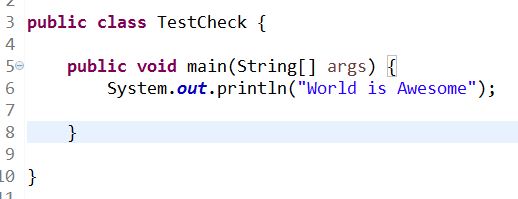
This is the access modifier of the main method. It has to be public so that java runtime can execute this method. If we make any method non-public then it’s not allowed to be executed by any program. Some access restrictions are applied. So it means that the main method has to be public.

Let’s see what happens if we don't define public

As we see, it throws and Error


Error: Main method not found in class com.checker.TestCheck, please define the main method as:
   public static void main(String[] args)
or a JavaFX application class must extend javafx.application.Application


static

When java runtime starts, there is no object of the class present. That’s why the main method has to be static so that JVM can load the class into memory and call the main method. If the main method won’t be static, JVM would not be able to call it because there is no object of the class is present.

Let’s see what happens when we remove static from java main method.


And after running this code


Error: Main method is not static in class com.checker.TestCheck, please define the main method as:
   public static void main(String[] args)


void

In Java it's mandateory that every method provide the return type. Java main method doesn’t return anything, that’s why it’s return type is void. This has been done to keep things simple because once the main method is finished executing, java program terminates.

main

This is the name of java main method. It’s fixed and when we start a java program, it looks for the main method.

Let's see what happens when we change the "main"


Here main has been changed to maintest.
Following error occurred...

Error: Main method not found in class com.checker.TestCheck, please define the main method as:
   public static void main(String[] args)
or a JavaFX application class must extend javafx.application.Application

String[] args


Java main method accepts a single argument of type String array. This is also called as java command line arguments.